Posts

Showing posts with the label General Solutions

Application failure. hr=0x80040101: Failed to initialize virtual machine
Image
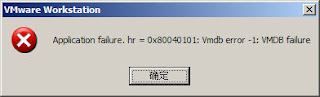
Hi There, Its 12:30 AM today in Pakistan and i have to do some work with my VMware. Tried to start it in normal and Administrator mode both but WOOOWWW..... ITS CRASHING....! I am getting a very weird error message that even Google did not provide any useful stuff to resolve this issue. Below are my environment details. OS  :  Windows 8.1 Pro VM :  VMWare Workstation 11.0.0 build-2305329 Error :   Application failure. hr=0x80040101: Failed to initialize virtual machine (This is not the actual screenshot of my error but the error was exactly same with the above Red text. I forgot to take screenshot of the error message before fixing it.) I tried registering few DLLs as shared by someone in Chinese language  here  but it did not help me. So i decided to figure it out myself. Could not imagine that it would be that lucky, simple and tricky. I tried restarting VM Ware services, logging Off an On to system, restarting the machin...


How to take memory dump of windows process menually

Image
Go to IIS, click on Server name & double click on Worker Processes Icon Get PID number of Application pool (ex: EDS-692) Go to Start, All programs, Launch DebugDiag1.2 Click on Cancel Go to Tools, select Options and Settings Make sure Manual Userdump Save folder should be “D:\DebugDiag” Go to Processes tab, select PID number of the Application pool, right click and select Create Full User dump option After collecting User Dump confirmation message will be displayed as below Also Check the dump file is present in the folder

Top Software Houses in Pakistan 2014

Image
Which one is the best Software Company in Pakistan? NetSol Technologies Ovex Technologies TRG Tech System Pvt Ltd Elixir Tech Ibds Tera Data Enterprise DB (Fusion Itech.) Kalsoft Si3 System Innovations Mentor Graphics Xavor Corporation CureMD Datum Square Macrosoft Pakistan i2c Inc Techlogix Mindstorm Studios Gameview Studios   

Picasa Error : the current user is not allowed to install or update applications

Image
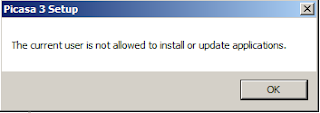
While installing Picasa on my newly installed OS on my machine i got this error " the current user is not allowed to install or update applications". after googling and spending sometime i got that its not actually picasa issue, its because of my OS and i tried a solution that worked for me. Solution 1. Go to Server Manager >> Features >> Add Feature  2. Check Deskop Experiance and install it. 3. Reboot the system and its gone.

Failed to connect to the Internet once repaired LAN connection

Image
Some times windows throws this error when you repair your LAN connection and then could not connect to the internet until you reboot your system. The error comes " windows could not finish repairing because renewing your ip address " once you click Repair option. Then you can not connect to the internet once you repair  your wired or wireless connection. Solution: Go to Control Panel >> Administrative Tools >> Services Locate DHCP Client and start it. That's It.

Dual SIM china mobile PC Suite or Phone Suite

Image
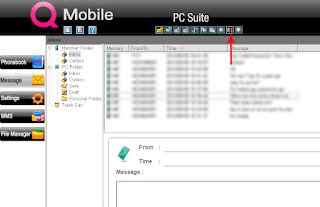
Here is SMS sending windows software for dual sim mobile. Its basically QMobile phone suit. This application work for Qmobile almost all models. You can try your luck with your other phone . It can be used as S MS sending windows software for dual SIM china mobiles. 1. Select Inbox and press this button to read all the SMS from mobile: 2. Now click Configrations: 3. Here you can select your SIM card which you want to use for SMS sending. Here is the download link:   http://www.mediafire.com/?rsx0iootbe3l4zi If you want to download COM Port drivers for china mobile or QMobile then follow this link. http://www.china-mobile-phone.com/service/download.htm

How to See/Find the List of All Sent Pending Friend Requests in Facebook 2012

Here is a method to find the pending requests that you sent on facebook and did not accepted yet. For Chrome Users: 1.  Go to  http://www.unfriendfinder.com/download  and click  Download & Install. 2. Accept warnings to download. 3. Restart Chrome and That's it. (may be you need to login again on facebook) For Firefox Users: 1.  Go to  https://addons.mozilla.org/fr/firefox/addon/748  and install Grease Monkey script. 2.  Go to  http://www.unfriendfinder.com/download  and click  Download & Install. 3. Accept warnings to download. 4. Restart Firefox and That's it. (may be you need to login again on facebook) That's It. Hope it works for you.

Themeforest Questions and Answers Solved!

Themeforest Solved questions... I spent some time to complete the   Themeforest.net   author quiz, most of the time i was failed. :O) here are the soleved questions. They are working until my last check on 02-04-2012. Good Luck If you’d like to use an asset within your file that someone else created and you’re unsure whether you’re allowed to, what should you do? – Ask a lawyer or the asset’s license holder Who decides how files are priced? – The ThemeForest staff Who is responsible for copyright violations in submitted files? – The author What will happen if your submission does not validate (excluding browser-specific CSS)? – It will be rejected Who is responsible for testing files to make sure there are no errors? – The author Who is responsible for copyright violations in submitted files? – The author Which of the following would be an appropriate file title? – CoPilot – WordPress and Tumblog Theme OR 20 Tiled Wood Textures What should you do if a...

How to set 100% height of HTML iFrame in all browsers

after searching over the google and spending some time me and my friend ali got this code working for us. I want to set the height of an iFrame 100% in all major browsers like IE,Mozzila,Chrome,Safari and Opera.  It can be done with the support of javascript. Here goes the code. HTML iFrame Code: <iframe align="center" id="iframe_id" name="iframe_id" src="http://www.paksmile.com/" scrolling="yes" width="100%" height="200px" frameborder="0" style="position:relative; bottom:0; left:0; top:0px;" onload="resize_iframe()"> The JavaScript Code: <script language="JavaScript"> window.onresize = resize_iframe; function resize_iframe() {   var viewportwidth;   var viewportheight;   var header = document.getElementById("iframe_id").offsetTop;   // the more standards compliant browsers (mozilla/netscape/opera) use window.i...

Jquery Toggle Stop Working Once Asp.Net Button Clicked

  I was working with Asp.Net 4.0 and suddenly got a problem that my Jquery toggle code doesn't work once i click the button. i searched over internet and found the following solution. It works for me perfectly.   function pageLoad() {             $(function () {                 $(document.getElementById('<%=btnAdd.ClientID%>')).click(function () {                     $("#AddVideo").slideToggle("slow");                 });             });         }

How to use IIS7 and WAMP server Windows 7

Image
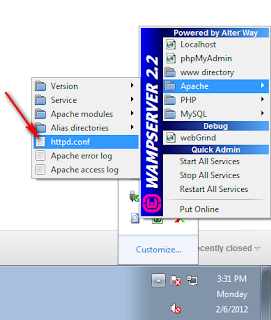
I was wondering its possible or not to run the IIS7 and WAMP server on the same machine while windows 7 is installed on my machine. After a little google search i got the answer YES its possible. Here are few steps to run both IIS7 and WAMP on your local development machine. 1. Go to WAMP >> Apache >> httpd.conf 2. Change the listen port from 80 to 81 or any other port that is not used before on your machine (in my case its 81). Change it all over the document (do find and replace). 3. Finaly restart your WAMP and go to your browser and type  http://localhost:81/ . You can change the 81 with your port number that you mentioned in step 2. Problem Solved :) If your problem solved join us on facebook too. http://www.facebook.com/pages/Chillax-Designs/232795453435684 Regards

wamp icon stays orange when skype is installed

Image
I got this problem when i install both skype and wamp on my local machine. Skype was working fine but wamp  server icons turns to orange and i failed to open it in localhost. The i do the following steps to turn the wamp icon to green. Login to Skype and go to   Tools >> Options >> Advance >> Connections and uncheck the use port check box. See the image below After you uncheck restart your skype and wamp and run the wamp first. Problems went and both working fine now. If your problem solved join us on facebook too. http://www.facebook.com/pages/Chillax-Designs/232795453435684 Regards