Posts

Showing posts with the label SharePoint 2016

Failed to query the OAuth S2S metadata endpoint at URI - Workflow Manager 2013
Image
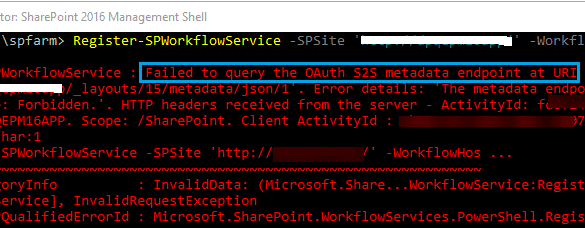
Since this is the backbone of SharePoint 2013 based workflows, I think Microsoft needs to make this application more mature and errors should be more clear and point to the root cause. Anyhow, that was just a suggestion, who cares. :) We have came across this error while it was working fine till yesterday. We removed the bindings and when it was needed to register the workflow again, this happened. Workflow Manager Error: WARNING: Overwriting existing scope named "SharePoint" in the workflow server. If another SharePoint farm was registered using this scope, that farm may not be able to continue working with the workflow server unless re-registered under another scope name. Register-SPWorkflowService : Failed to query the OAuth S2S metadata endpoint at URI ' https://mysitename.com/_layouts/15/metadata/json/1'.  Error details: 'An error occurred while sending the request.'. HTTP headers received from the server - ActivityId: 87239463-ea78-4ccc-81cd-a1ec0b903b...

Download file failed signature verification and may have been tampered with - Workflow Manger 1.0 Refresh (CU2)

Image
Since there is no major updates in Workflow Manager installation process for last couple of years, the offline installation became really difficult. Microsoft recommends to install it through WPI  tool, however sometimes the online installation also becomes a nightmare. This is what happened recently. Problem Description: For one of our client, we had to prepare environment with following. SharePoint Server Enterprise 2019 Window Server 2019 Standard Workflow Manager 2013 As usual I followed the same installation guide which ran fine few weeks ago with another different environment but here we faced the below error while installing Workflow Manager Refresh 1.0 (CU2). "The product did not install successfully. Download file failed signature verification and may have been tampered with" Tried to run the setup multiple times but nothing helped. Checked all the available discussion threads on Microsoft's and other forums but nothing helped much. However I must thanks PeterFle...

Microsoft SharePoint Server 2016 encountered an error during setup

Image
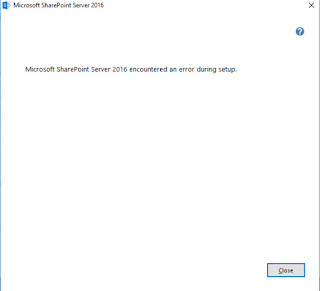
Microsoft SharePoint Server 2016 encountered an error during setup The Error: While installing SharePoint Server 2016 RTM version downloaded directly from Microsoft's website, We faced below error and wasted our days in troubleshooting. Tried almost every solution we found on Internet till date including increasing the cores of servers and virtual processors as well. However, this error was a nightmare as there was no sufficient details about error. Microsoft SharePoint Server 2016 encountered an error during setup Solution: There could be several other reasons for this error, however in my case, this was the dumbest thing I have ever seen with installation. We were trying to install SharePoint 2016 from its ISO by right click > Mount and then install using normal splash. Extracting SharePoint 2016 files to a separate directory and then installing it fixed the problem. May be the SharePoint didn't like the mounted drive letter. :) Hope it helps...!

Service Bus Gateway service stuck at Starting

Image
Lesson Learned: Never leave your servers to automatically download and install the updates. We had a SharePoint farm where Workflow manager is configured on one of its server and rest of them are just using WFM client to connect with the server. Everything was running smooth until some updates got installed on the servers over night and the next morning Workflows stuck and start giving errors. As initial check, I verified SharePoint services and WFM services, noticed that the Service Bus Gateway service is struck at Starting state. This was very generic thing but at least a point to start thinking... Troubleshooting: 1. Tried manual restart, but no luck. 2. Tried Leaving and Joining the WFM Farm again. But the timeout error. Error message received during rejoining:  “Starting Service bus gateway on machine <servername> failed: timeout has expired and the operation has not been completed” 3. Tried ULS check and noticed below error. "  Service cannot be started. Micr...

Claim identity is not from a trusted login provider. identity name - Issue while logout FBA SharePoint authentication

New year, new challenges...! I'll try to be quick and to the point for this post. For one of our clients, we have FBA implemented on their portals with custom SQL database. When we login with a user account, it works fine. The user can login, move around different pages and settings, However, when user try to Logout or Sign out, the page crashes. Exactly similar problem as with this mate. However I couldn't put a comment there due to thread locked. I checked the ULS logs and the Unexpected entry said. Unexpected: Claim identity is not from a trusted login provider. identity name #.f0.blahblahDomains\blahblachAccount Struggled around for few hours but no results. Finally something tricked in mind and I added below entry in my web application's web.config before   </system.web> <? xml version= "1.0" encoding= "UTF-8" ?> < sessionState mode = "SQLServer" timeout = "60" allowCustomSqlDatabase = "true" sqlCon...

Components that could break after SharePoint upgrade

Although you can predict most of the stuff that could go wrong after a SharePoint upgrade or migration but still there are chances that you miss something. I have compiled a list of components that could break or stop working after you move to new SharePoint environment. I'll be updating this post whenever i found anything else breaking after SharePoint upgrade. I apologize for my rough formatting. :) InfoPath: Connections with external services and libraries. Connection with User Profile Service Application. When upgrading to 2013 from 2010, you need to update where fetching User Information like User Name User Friendly Name. SharePoint 2013 works on Claims Based Authentication so InfoPath 2010 Form Views may crash if you are showing view on user based. OneNote: OneNote Sync URL change OneNote not syncing Static URLs: Static URL's used in Web Pages, Always use relative URLS Connected Excel Files: Data exported in Excel files could break if URL change after mig...

SharePoint 2013 Manual Smoke Testing Guide

Hi, There are thousands of test cases and a lot of ways for testing SharePoint environment after a fresh installation or any upgrade. However, after each farm level change its necessary to smoke test your SharePoint farm to ensure availability, performance, functionality, security and look & feel. I would try to cover as much point as i can to smoke test SharePoint farm with Manual Testing. This could apply to all SharePoint environments including MOSS 2007, SharePoint 2010, SharePoint 2013 or SharePoint 2016. Its possible that i could not cover all of the test scenarios at once, but i'll try to keep updating this post time to time and include new test cases. I would not explain the exact steps to perform a test case here. The purpose of this post is to only highlight the area and components from where SharePoint could be smoke tested. In current scenario i am testing my SharePoint 2013 environment with compare to SharePoint 2010 environment as i have upgrade...

SharePoint 2013 Crawl Rules not Excluding Search Results but matching the rules

Image
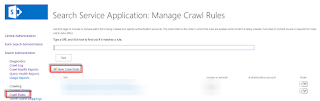
This issue happened with me in SharePoint 2013 however i believe the resolution would be the same for SharePoint 2010 and SharePoint 2016 environments. Problem: I have SharePoint 2013 environment and i need to remove all the search results under a specific URL. I created a Crawl Rule to Exclude content, in few cases it did not excluded any content and sometimes it excluded only a partial content. I ran an Incremental Crawl each time i create any rule but same results. Scenario:  I have site collection under https://webapplication/pa/b and i want to remove all the search results under this URL. This is how i created the rule. Created the above rule and press OK. Now for testing if this rules matches our query, i have provided it a sample URL and it matches one of our rule. However, when i ran incremental crawl, the target URL was still appearing in my search results which i didn't want. Solution: If it matches your rules but do not ...

SharePoint 2013, 2016 and 2019 Architecture for a Failover Environment

Image
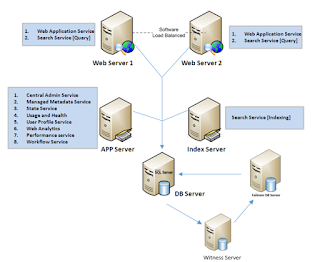
There are two ways to set a failover SharePoint environment. This is also known as SharePoint disaster recovery plan. In case your farm goes down, you should have options to make it up in few seconds, minutes, hours or days depending on the approach which you select. There are three types of standby  plans in SharePoint. The time and immediate effort to get a replacement farm up and running defines the standby type. Cold standby. A secondary data center that can provide availability within hours or days. Warm standby. A secondary data center that can provide availability within minutes or hours. Hot standby. A secondary data center that can provide availability within seconds or minutes. Here we are discussing the Hot standby plans. The first approach, I consider it Hot standby because it immediately shifts to the secondary node of SQL for the desired database in few seconds only without engagement of any team member i.e. SharePoint, SQL or Network guys. This is less expensi...