Posts

Showing posts with the label SharePoint 2019

Failed to query the OAuth S2S metadata endpoint at URI - Workflow Manager 2013
Image
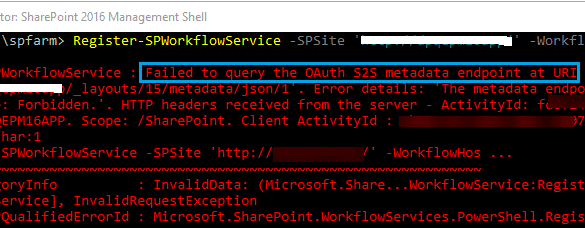
Since this is the backbone of SharePoint 2013 based workflows, I think Microsoft needs to make this application more mature and errors should be more clear and point to the root cause. Anyhow, that was just a suggestion, who cares. :) We have came across this error while it was working fine till yesterday. We removed the bindings and when it was needed to register the workflow again, this happened. Workflow Manager Error: WARNING: Overwriting existing scope named "SharePoint" in the workflow server. If another SharePoint farm was registered using this scope, that farm may not be able to continue working with the workflow server unless re-registered under another scope name. Register-SPWorkflowService : Failed to query the OAuth S2S metadata endpoint at URI ' https://mysitename.com/_layouts/15/metadata/json/1'.  Error details: 'An error occurred while sending the request.'. HTTP headers received from the server - ActivityId: 87239463-ea78-4ccc-81cd-a1ec0b903b...

Download file failed signature verification and may have been tampered with - Workflow Manger 1.0 Refresh (CU2)

Image
Since there is no major updates in Workflow Manager installation process for last couple of years, the offline installation became really difficult. Microsoft recommends to install it through WPI  tool, however sometimes the online installation also becomes a nightmare. This is what happened recently. Problem Description: For one of our client, we had to prepare environment with following. SharePoint Server Enterprise 2019 Window Server 2019 Standard Workflow Manager 2013 As usual I followed the same installation guide which ran fine few weeks ago with another different environment but here we faced the below error while installing Workflow Manager Refresh 1.0 (CU2). "The product did not install successfully. Download file failed signature verification and may have been tampered with" Tried to run the setup multiple times but nothing helped. Checked all the available discussion threads on Microsoft's and other forums but nothing helped much. However I must thanks PeterFle...

SharePoint 2013, 2016 and 2019 Architecture for a Failover Environment

Image
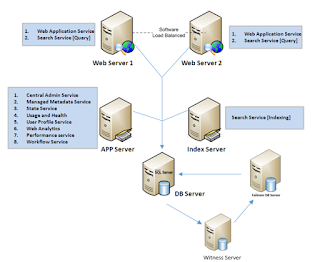
There are two ways to set a failover SharePoint environment. This is also known as SharePoint disaster recovery plan. In case your farm goes down, you should have options to make it up in few seconds, minutes, hours or days depending on the approach which you select. There are three types of standby  plans in SharePoint. The time and immediate effort to get a replacement farm up and running defines the standby type. Cold standby. A secondary data center that can provide availability within hours or days. Warm standby. A secondary data center that can provide availability within minutes or hours. Hot standby. A secondary data center that can provide availability within seconds or minutes. Here we are discussing the Hot standby plans. The first approach, I consider it Hot standby because it immediately shifts to the secondary node of SQL for the desired database in few seconds only without engagement of any team member i.e. SharePoint, SQL or Network guys. This is less expensi...