Posts

Application failure. hr=0x80040101: Failed to initialize virtual machine
Image
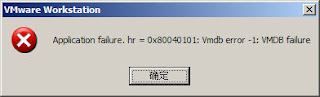
Hi There, Its 12:30 AM today in Pakistan and i have to do some work with my VMware. Tried to start it in normal and Administrator mode both but WOOOWWW..... ITS CRASHING....! I am getting a very weird error message that even Google did not provide any useful stuff to resolve this issue. Below are my environment details. OS  :  Windows 8.1 Pro VM :  VMWare Workstation 11.0.0 build-2305329 Error :   Application failure. hr=0x80040101: Failed to initialize virtual machine (This is not the actual screenshot of my error but the error was exactly same with the above Red text. I forgot to take screenshot of the error message before fixing it.) I tried registering few DLLs as shared by someone in Chinese language  here  but it did not help me. So i decided to figure it out myself. Could not imagine that it would be that lucky, simple and tricky. I tried restarting VM Ware services, logging Off an On to system, restarting the machin...

SharePoint Web Services Error : An item with the same key has already been added

Image
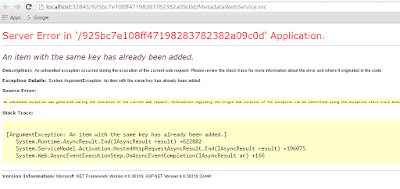
Hi There, Recently i found that none of my SharePoint 2013 application services are working. Crashing and throwing unknown multiple kind of errors in event viewer. One of the famous error that i found was below with Event ID 3. [code]WebHost failed to process a request. Sender Information: System.ServiceModel.Activation.HostedHttpRequestAsyncResult/47208365 Exception: System.ArgumentException: An item with the same key has already been added. at System.Runtime.AsyncResult.End[TAsyncResult](IAsyncResult result) at System.ServiceModel.Activation.HostedHttpRequestAsyncResult.End(IAsyncResult result) Process Name: w3wp Process ID: 12724 [/code] While troubleshooting i noticed that none of SharePoint Web Services are browsing and crashing with below error. I knew that it isn't any SharePoint specific error so i tried to recall the changes i have done on server. Server Error in '/925bc7e108ff47198283782382a09c0d' Application. An item with th...

Could not load file or assembly 'Microsoft.Workflow.Client

This issue was really a headache for me today. In my farm of four servers i have 2 WFE and 2 APP servers (of course a DB server separately). I have configured Workflow Manager on 1 APP server and Workflow Manager Client on all of the remaining servers. Suddenly i started getting error on workflows and the GUID lead me to the below ULS logs of SharePoint. [code]07/15/2016 23:28:06.77 w3wp.exe (0x0E40) 0x2B54 SharePoint Foundation Logging Correlation Data xmnv Medium Name=Request (GET:http://mysharepointapplication:80/newsite/test/_layouts/15/Workflow.aspx?ID=20&List=%7B18957A04-11A4-4016-9404-B1D3897619EF%7D&Source=http%3A%2F%2Fmysharepointapplication%2Fit%2Fsystems%2Fsystems%2Ftest%2FLists%2FCustom%2520List%2FAllItems%2Easpx%3FInitialTabId%3DRibbon%252ERead%26VisibilityContext%3DWSSTabPersistence) da1f909d-545f-60b2-1cdd-8923ed950a7a 07/15/2016 23:28:06.77 w3wp.exe (0x0E40) 0x2B54 SharePoint Foundation ...

How to get custom user profile property from SharePoint User Profile Service using JavaScript AJAX client side script

Image
Hi There, SharePoint provides a wonderful facility of client side scripts to get data from SharePoint objects. You can get custom user profile property from SharePoint User Profile Service using JavaScript AJAX calls. Below is an example. I have an AD property with name "Initials" that do not comes in SharePoint OOTB  User Profile Service and you have to bind it manually. I have set its internal name also "Initials" in my User Profile Service while binding it. We'll call this property using the same name. Remember that, you can only call a User Profile Property from its internal name. I have bonded it with "Initials" attribute of AD and set the Direction to Import . Click Add. Now the custom property is appearing when i edit any user profile. Below is my JavaScript code. [code]//Display User profile properties function getMyUserProfile(success, error) { var siteUrl = _spPageContextInfo.siteAbsoluteUrl;...

SharePoint Client Side REST API 500 Internal Server Error

Image
Hi There, I have been now in code again since last two months and facing the developer life challenges :P . I am calling the GetMyProperties from client side REST API method  "/_api/SP.UserProfiles.PeopleManager/GetMyProperties" but my site is throwing 500 internal server error or 400 bad request . Life time annoying errors :-/ . My code was working fine on my dev machine but not on client's server, so apparently its a server configuration issue. Things to check when you get 500 Internal Server Error or similar IIS erros on " /_api/XXXXXXXXXXXXXXXX" or same kind of issues is,  1. Check your User Profile Service is running properly 2. Check your my site is configured properly 3. Check your my site is configured in my site host application in User Profile Service In my case, the issue was, my MySite was not configured in User Profile Service and when i open MySite it throws error and a correlation ID. So i added my MySite in User Profile...

Traverse all users permissions on SharePoint 2010,2013 Site Collection PowerShell

Image
Hi There, I have found a very useful PowerShell script to traverse all users permissions on SharePoint 2010,2013 Site Collection using PowerShell. Thanks to Johan Mayer for updating the PowerShell code and making it more useful. This PowerShell code will traverse or extract all users having permissions through any of SharePoint group and any level of permission. For example, if a User has permissions using three groups Readers, Contributors and Owners, it will show all groups one by one and describe the user permissions level in each group. Sample screenshot below. PowerShell Script: You can copy and paste this PowerShell script in a simple notepad file and save as .ps1 file. Now run SharePoint Management Shell and point to the file where you have just saved. This script will traverse users permissions inside the lists/libraries too. You can filter the data once exported in CSV. function Get-SPUserEffectivePermissions ( [object[]] $users...

SharePoint 2013 Blog Post Error : TypeError: Unable to get property 'id' of undefined or null reference

Image
Hi There, Its a brand new installation with no customization on SharePoint site. I created a blog type subsite called "News" in SharePoint and faced the below error. This error comes up when i created a blog post in SharePoint from User1 account and then open the same post with User2  account which had read only permissions on the site.  TypeError: Unable to get property 'id' of undefined or null reference OR TypeError: Unable to get property 'trim' of undefined or null reference My current version of SharePoint was RTM 15.0.4420.1017. I installed the SharePoint Server SP1 (15.0.4569.1000) and the error " TypeError: Unable to get property 'id' of undefined or null reference " went away. Mean while i tested the same thing on another RTM version of SharePoint where it worked fine without any issue and  installation  of SP1. Hope it will help someone...! Happy SharePointing...!