Posts

How to hide "Site Actions" in SharePoint 2010/2013 without code change or JS/CSS

Image
Recently i faced this issue that "Readers" (people with read permissions on site) were unable to see "Site Actions" button on site but it was working fine for Contributors and above levels. Readers were able to see the ribbon on other sites even any subsite in the problematic site. I checked for Master Pages, Page Layouts or any custom code like CSS or JS made by any champion in my team which can hide it from Readers but everything looked fine to me. So i decided to nail it. No "Site Action" Visible Following the basic rule "Divide a problem into sub-problems and then solve one by one" i started checking for permissions and finally found the issue. The reason was ,my business users (who were not SP professionals) played with site settings and permissions configurations that resulted in "Site Actions" visibility lost for readers. I followed the below steps and issue resolved for me. Click on "Site Actions -> Site...
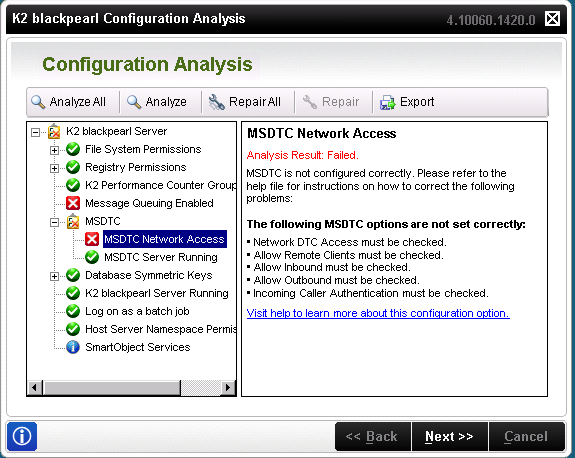
K2 Installation Error : MSDTC Network Access

Image
Let's resolve these bulleted points. Open the Component Services snap-in. To open Component Services, click  Start . In the search box, type  dcomcnfg , and then press ENTER. Expand the console tree to locate the DTC (for example,  Local DTC ) for which you want to enable Network MS DTC Access. On the  Action  menu, click  Properties . Click the  Security  tab and make the following changes: In  Security Settings , select the  Network DTC Access  check box. In  Transaction Manager Communication , select the  Allow Inbound  and  Allow Outbound  check boxes. Click  OK . Ref: https://technet.microsoft.com/en-us/library/cc753620(v=ws.10).aspx Click OK. It will ask you to confirm the restarting of a relevant service. Press Yes. Issue fixed.

SharePoint server status "Installation Required" or "Upgrade Blocked"

Image
I have noticed that servers in my SharePoint 2010 farm are showing statuses like "Installation Required" or "Upgrade Blocked". Copied image It happens when you install the SharePoint patches across the farm but somehow some of the servers are unbale to upgrade during patches installations. Installation Required :  The server still not yet installed with the same CU that already installed in other servers in the farm. Upgrade Blocked :  The server is blocked from upgrade as they are on latest CU than other servers in the Farm. Current Server is installed with latest CU and it will remained blocked until all the other SP servers in the farm are installed with the same version.

ID3242: The security token could not be authenticated or authorized SharePoint 2010, SQL Reporting

Image
ERROR: ID3242: The security token could not be authenticated or authorized SharePoint 2010, SQL Reporting Solution: Start/Restart Claims to Windows Token Service https://msdn.microsoft.com/en-us/library/ee517278.aspx

How to take memory dump of windows process menually

Image
Go to IIS, click on Server name & double click on Worker Processes Icon Get PID number of Application pool (ex: EDS-692) Go to Start, All programs, Launch DebugDiag1.2 Click on Cancel Go to Tools, select Options and Settings Make sure Manual Userdump Save folder should be “D:\DebugDiag” Go to Processes tab, select PID number of the Application pool, right click and select Create Full User dump option After collecting User Dump confirmation message will be displayed as below Also Check the dump file is present in the folder

Why 1250 items, if the limit is 5000 - SharePoint List Threshold

It was quite challenging and surprising as well for me that why SharePoint list is showing 1250 items only while the threshold limit it set to 5000 items. I found this  link  but it wasn't so much helpful to understand the reason.  As per Microsoft on this   article, SharePoint list shows 1250 items in the following scenario.  "If a user creates or loads a view that cannot use an index to query the list, then Metadata Navigation and Filtering will construct and execute a fallback query. A fallback query is a modified version of the original user query that displays a partial set of the items requested because it queries against only a portion of the list instead of the entire list. It is intended to provide you with some useful results in circumstances when the original query is blocked due to large list throttling. Up to 1,250 of the newest items are displayed based on when those list items were added to the list. Occasionally, fallback querie...

GREYCstoration Oil Paint plugin for Photoshop

Image
Oil Paint Filter is missing in Photoshop? Try GREYCstoration plugin. An alternate for Oil Paint filter. I found my Adobe Photoshop CS5 is missing Oil Paint filter plugin due to GPU unavailable on my machine. I found an alternate tool to get oil painting effect on photos. Below are the steps to use this tool. 1.  Download  tool and extract http://www.mediafire.com/download/3j15dj3opmip4ez/GreycShop.zip 2. Copy the extracted files on below path(s)     For 64Bit: C:\Program Files\Adobe\Adobe Photoshop CS5 (64 Bit)\Plug-ins     For 32Bit: C:\Program Files (x86)\Adobe\Adobe Photoshop CS5\Plug-ins 3. Run Adobe Photoshop 4. Select Noise >> GREYCstoration  For example: Enjoy :)