Posts

CSS and JavaScript Not Loading After URL Rewriting ASP.NET 4.0

Image
Hi There... while working on a project i needed URL rewriting for it. I searched over internet and got a beautiful and detailed article by "Scott". Finally i have done rewriting but i got another problem that my CSS and JavaScript files are not going to be attached again with my project and my project looks too bad now without colours. so here is the solution which works for me. Note: You have to change this when you are working on local server or development server. Note: When you finished your development and going to deploy on your web server just change it to following CSS path after IIS url rewrite or your web.config rewrite or CSS not working after using URL rewriting is a common problem.  so you must set the paths like above. Note that its not only the solution for this problem. Just google out your problem and you'll got a lot of solutions about this problem. Many Thanks
Jquery Toggle Stop Working Once Asp.Net Button Clicked

  I was working with Asp.Net 4.0 and suddenly got a problem that my Jquery toggle code doesn't work once i click the button. i searched over internet and found the following solution. It works for me perfectly.   function pageLoad() {             $(function () {                 $(document.getElementById('<%=btnAdd.ClientID%>')).click(function () {                     $("#AddVideo").slideToggle("slow");                 });             });         }

How to use IIS7 and WAMP server Windows 7

Image
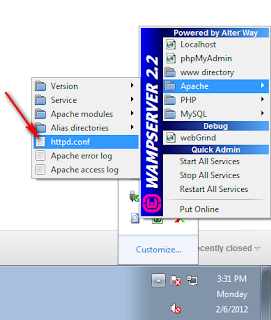
I was wondering its possible or not to run the IIS7 and WAMP server on the same machine while windows 7 is installed on my machine. After a little google search i got the answer YES its possible. Here are few steps to run both IIS7 and WAMP on your local development machine. 1. Go to WAMP >> Apache >> httpd.conf 2. Change the listen port from 80 to 81 or any other port that is not used before on your machine (in my case its 81). Change it all over the document (do find and replace). 3. Finaly restart your WAMP and go to your browser and type  http://localhost:81/ . You can change the 81 with your port number that you mentioned in step 2. Problem Solved :) If your problem solved join us on facebook too. http://www.facebook.com/pages/Chillax-Designs/232795453435684 Regards

wamp icon stays orange when skype is installed

Image
I got this problem when i install both skype and wamp on my local machine. Skype was working fine but wamp  server icons turns to orange and i failed to open it in localhost. The i do the following steps to turn the wamp icon to green. Login to Skype and go to   Tools >> Options >> Advance >> Connections and uncheck the use port check box. See the image below After you uncheck restart your skype and wamp and run the wamp first. Problems went and both working fine now. If your problem solved join us on facebook too. http://www.facebook.com/pages/Chillax-Designs/232795453435684 Regards

sys is undefined in asp.net Framework 4.0

Image
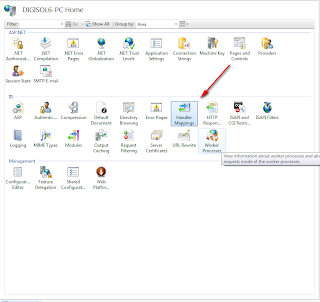
      I was using as VS 2010 and SQL server 2008 R2 and build an application which was running fine on my Local  System but when i upload it to my Hosting server (Online) it genrate an error that says 'sys is undefined.  . NET Ajax client-side Framework  failed to load' . i was using Routing in my site as well so i thought may be its because of routing so i just create a blank page with AJAX Toolkit but still got the error. To solve this i search all over the internet,read blogs,take experts advice and do what ever they said to solve it but nothing work for me.  i add keys in web.config,change in global.ascx but did not work. finally i solved it with a little changes in my IIS7 on the Hosting server which worked for me.  Here are the steps... 1. Open IIS7 in your server and locate the "Handler Mappings" 2. Now Find the path "ScriptResource.axd" in the list i.e : if it does not exist in your paths then just add it w...

How to remove the "Windows Genuine Advantage Notification Installation Wizard" ?

Image
Here is just 1 step to stop Windows Genuine Advantage Notification Installation Wizard. Step 1. go to C:\WINDOWS\system32\KB905474 and delete all files or delete the entire folder of "KB905474" and thats it. There is no more Windows Genuine Advantage Notification Installation Wizard in you computer until you mess up again with updates. Regards

VB6 portable download (Visual Basic 6 Portable) Mediafire Link

Image
  Visual Basic 6 portable. Its outdated now but this version is free and simple. No installation required. Download: http://www.mediafire.com/?7vz25rbsp792f3x