Posts

Copy SharePoint Online site pages from one site to another - Easy PowerShell Script

Image
There are several PowerShell scripts and multiple ways OOTB and using third party to copy SharePoint Online Pages from one site to another. However, sometimes it might become a hectic job when you are limited to use OOTB available features only.  I had to copy SharePoint Online site pages to another subsite, and here is the final script that I came up with. You need to download and install  SharePoint Online Management Shell from Microsoft web site and then run it as administrator. After that, copy below script (of course by updating the Source and Destination sites URL) in a notepad file, save it as .ps1 file and then just run this script.    $SourceSiteURL = "https://company.sharepoint.com/sites/ParentSite/ChildSite1" $DestinationSiteURL = "https://company.sharepoint.com/sites/ParentSite/ChildSite2" Connect-PnPOnline $SourceSiteURL -UseWebLogin $Files = Find-PnPFile -List "SitePages" -Match * foreach ( $file in $Files ) { Connect-PnPOnline ...
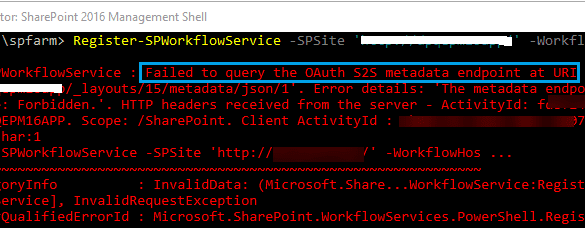
Failed to query the OAuth S2S metadata endpoint at URI - Workflow Manager 2013

Image
Since this is the backbone of SharePoint 2013 based workflows, I think Microsoft needs to make this application more mature and errors should be more clear and point to the root cause. Anyhow, that was just a suggestion, who cares. :) We have came across this error while it was working fine till yesterday. We removed the bindings and when it was needed to register the workflow again, this happened. Workflow Manager Error: WARNING: Overwriting existing scope named "SharePoint" in the workflow server. If another SharePoint farm was registered using this scope, that farm may not be able to continue working with the workflow server unless re-registered under another scope name. Register-SPWorkflowService : Failed to query the OAuth S2S metadata endpoint at URI ' https://mysitename.com/_layouts/15/metadata/json/1'.  Error details: 'An error occurred while sending the request.'. HTTP headers received from the server - ActivityId: 87239463-ea78-4ccc-81cd-a1ec0b903b...

How to update preferred language (MUILanguages) in SharePoint Online using Power Automate

Image
This is pretty much something that I have not found in a direct way on internet so I thought I must write about it and make someone else's life easier someday. Scenario:  I have scenario where my customer has SharePoint Online portal with multilingual support and some custom developed web parts. During the development phase, the tenant was different and I was able to redirect user to MyAccount so he can change the preferred language,  but this setting was not available on customer's tenant. The reason was, we had Azure AD profiles while customer has synced them from local AD so this setting was not available. I recommend you to check out my this post about the language switch issue that I faced. Problem:   Since the manually preferred language change option was not available, we need to find another way where user can switch to any other language. In my case it was switch to Arabic from English. Solution Overview: Since the preferred way to make the language switch should...

This setting is managed by your organization. You can set display languages through individual applications. O365

Image
You might came across below error while trying to change your preferred display language in MyAccount O365. This setting is managed by your organization. You can set display languages through individual applications. Learn more about how to do this or contact your IT administrator. There could be few reasons for this error, couple of them are below. 1. Admin has set a policy that users cannot set their preferred language 2. Your organization has migrated or synced the AD from local to Azure How to change Preferred Language then? Method 1: In this case, the users cannot change their preferred language from UI. However, Admins can change their preferred language in local AD and set the prefferedLanguage attribute so the users will have the preferred language. Method 2: The other possible way is to set "MUILanguages" programmatically   using a REST API call to Azure user profile. This will update this attribute in AD for the specified user and able to set its preferred language....

Get SharePoint list items using PNP/SP - React in SPFX web part

Image
Hope this post finds you well. I have just started learning SPFX and and I found it pretty interesting using React. TypeScript is a whole new world than a legacy development technique. It gives you new ways to think and implement your code. Let start working and stop talking. Note: Before starting this article, it is assumed that you have already setup your environment  according to Microsoft's guidelines. This is very important that you read and perform all the installation steps carefully as if there will be a minor change in the installation software versions, you won't be able to do many operations later on. Steps that we'll do to achieve this task are below: Create solution and web part using YO. Install PNP/SP Create SharePoint list Write React and PNP code Test web part on workbench Lets start...!   ✌ 1. Create solution and web part using YO. First, lets create a solution and choose a web part to create. For this, create a folder in your drive with the project name. ...

Clone or Copy SharePoint Online Site Collection With Lists Content

Image
Modern problems need modern solution...! Although we have spent years with SharePoint On-Premises but its time to move on SharePoint Online. Being SharePoint Administrator in past, now you may have to deal with Microsoft Cloud Admin. It was pretty easy in good old days to copy or clone a site using backup restore or using export import methods. However, that thing do not work anymore in SharePoint Online. You have to try different approach and syntax for this. There are several articles on this but I found this one which lead me to different type of errors and ultimately to the actual solution I was looking for. Here is how I did it... There are three main components in this article. Create a Site in SharePoint online with some dummy data Use PNP PowerShell to backup the site template and list data Create new site and restore the template Important :  The commands I will be using in this article are different than the used in above mentioned article. To run these commands, you nee...