Posts

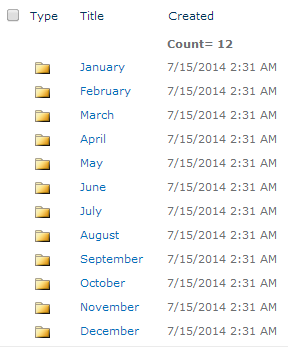
How to move SharePoint list items to a folder and subfolders in the same list using C# programmatically?
Image
It was really simple at the end, but it took my whole day for writing the utility to achieve the desired results. However, the tricky part of the utility was how i can move the items to a sub folder of the list. For example there is a folder 2014 and it contains 12 folders of each month. You want to move the item inside a folder. Keep in mind the hierarchy of SharePoint. Follow below steps. 1. Get SPWeb 2. Get SPList 3. Get List Folders 4. Get Sub Folders of Folders 5. Copy the Item I have divided the steps into Methods. Code below. Get Site,Web and list Objects and Passing them to a method InsertItemIntoFolder. using (SPSite site = new SPSite( "Your Site URL" )) {     using (SPWeb web = site.OpenWeb())     {         SPList sourceList = web.Lists.TryGetList( "Your List Name" );         List < Guid > IID = new List < G...

How to find which pages are using a specific web part in MOSS 2007 or SharePoint 2010 site collection?

I got a utility with the help of one of my colleague to find w here is a custom web part used in SharePoint page? Download the utility from the below link. http://wikisend.com/download/302420/WebPart Finding Utility.zip 1. Open CMD 2. Navigate the path where you have placed the utility 3. Run Utilityname.exe sitecollectionURL nameofthewebpart       GetWP.exe  http:// test.contoso.com   view Where GetWP.exe is the utility name, http://test.contoso.com is the site collection URL and View is the name of the webpart. Full name is not necessary for webpart, you can use any sub string of the name. eg. listviewrollup = view Hope it helps someone. Thank You

Convert MOSS 2007 DB to SharePoint 2010 Content DB using STSADM

Here are the steps... - Get a DB backup from MOSS DB (SQL) server - Restore it on SharePoint 2010 DB (SQL) Server - Run the stsadm command below stsadm.exe –o addcontentdb –url http://mytargertwebapplication:portnumber/  -databasename “put DB name here” -databaseserver "SP2010 DB Server” OR stsadm -o addcontentdb -url "http://mytargertwebapplication:portnumber/ " -databasename put DB name here -databaseserver SP2010 DB Server

Workaround after changing managed account password in SharePoint 2010

After changing managed account password or SharePoint server account password there are multiple types of issues that can occur in your farm. I am trying to cover the major steps on high level. Changing Password Open Central Administration and navigate to Security then Configure managed accounts. Edit the desired account and setup a new password. Logout from the farm. Testing password changes         4.    Restart Servers         5.    Login with newly setup password on the server          6.    Check SharePoint services if running           Clearing SharePoint Cache          7.    Stop SharePoint Services Timer from the services          8.    Open  Drive:\ProgramData\Microsoft\SharePoint\Config\GU...

How to take backup of farm,web application,site collection,site,list and library, service application and SharePoint configuration using PowerShell

SharePoint PowerShell Backup and Restore Commands The following are examples of different SharePoint PowerShell commands you can use to back up and restore various components of your SharePoint environment. A complete farm backup followed by a restore: Backup-SPFarm –Directory \\App01\SharePointBackups -BackupMethod Full Restore-SPFarm –Directory \\App01\SharePointBackups -RestoreMethod New Back up and restore a service application: Backup-SPFarm –Directory \\App01\SharePointBackups -BackupMethod Full –Item "Excel Services" Restore-SPFarm –Directory \\App01\SharePointBackups -RestoreMethod New –Item "Excel Services" Back up and restore farm configuration information only: Backup-SPConfigurationDatabase –Directory \\App01\SharePointBackups Restore-SPFarm –Directory \\App01\SharePointBackups –RestoreMethod Overwrite –ConfigurationOnly Back up and restore your SharePoint content databases: Backup-SPFarm –Directory \\App01\SharePointBackups -BackupMe...

STSADM commands for SharePoint backup and restore

SharePoint STSADM Backup and Restore Commands The following are examples of different STSADM commands you can use to back up and restore various components of your SharePoint environment. A full farm backup followed by a restore: stsadm -o backup -url http://app01/ -directory \\app01\sharepointbackups -BackupMethod Full -Quiet stsadm -o restore -url http://app01/ -filename \\app01\sharepointbackups –Overwrite Back up and restore configuration information only: stsadm -o backup -url http://app01 -directory \\app01\sharepointbackups -configurationonly -quiet stsadm -o restore -url http://app01 -filename \\app01\sharepointbackups -configurationonly –quiet Back up and restore a service application: stsadm -o backup -directory \\app01\sharepointbackups -quiet -backupmethod full -item "Excel Services" stsadm -o restore -directory \\app01\sharepointbackups -item "Excel Services" –quiet Back up and restore a site collection: stsadm -o backup -url http://...

How to create simple custom SharePoint timer job

Hi, Few things to create a custom timer job. 1. Create a Feature 2. Create a .cs file and inherit SPJobDefinition and write custom code there. The SP Feature Code Behind: You can change the GUID here if it exists already or creates any issue... [ Guid ( "6ecf1f21-11fa-4109-baf7-0099347b5031" )]     public class Entropic_Top_Blog_PostsEventReceiver : SPFeatureReceiver     {         // Uncomment the method below to handle the event raised after a feature has been activated.           public override void FeatureActivated( SPFeatureReceiverProperties properties)         {             SPWebApplication webApp = properties.Feature.Parent as SPWebApplication ;               // make sure the job isn't already ...