Posts

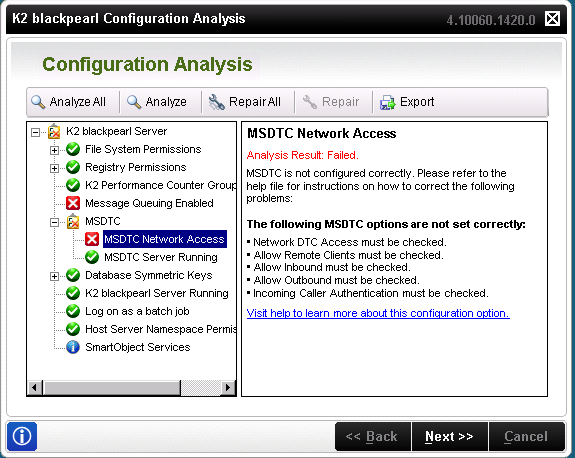
K2 Installation Error : MSDTC Network Access
Image
Let's resolve these bulleted points. Open the Component Services snap-in. To open Component Services, click  Start . In the search box, type  dcomcnfg , and then press ENTER. Expand the console tree to locate the DTC (for example,  Local DTC ) for which you want to enable Network MS DTC Access. On the  Action  menu, click  Properties . Click the  Security  tab and make the following changes: In  Security Settings , select the  Network DTC Access  check box. In  Transaction Manager Communication , select the  Allow Inbound  and  Allow Outbound  check boxes. Click  OK . Ref: https://technet.microsoft.com/en-us/library/cc753620(v=ws.10).aspx Click OK. It will ask you to confirm the restarting of a relevant service. Press Yes. Issue fixed.

SharePoint server status "Installation Required" or "Upgrade Blocked"

Image
I have noticed that servers in my SharePoint 2010 farm are showing statuses like "Installation Required" or "Upgrade Blocked". Copied image It happens when you install the SharePoint patches across the farm but somehow some of the servers are unbale to upgrade during patches installations. Installation Required :  The server still not yet installed with the same CU that already installed in other servers in the farm. Upgrade Blocked :  The server is blocked from upgrade as they are on latest CU than other servers in the Farm. Current Server is installed with latest CU and it will remained blocked until all the other SP servers in the farm are installed with the same version.

ID3242: The security token could not be authenticated or authorized SharePoint 2010, SQL Reporting

Image
ERROR: ID3242: The security token could not be authenticated or authorized SharePoint 2010, SQL Reporting Solution: Start/Restart Claims to Windows Token Service https://msdn.microsoft.com/en-us/library/ee517278.aspx

How to take memory dump of windows process menually

Image
Go to IIS, click on Server name & double click on Worker Processes Icon Get PID number of Application pool (ex: EDS-692) Go to Start, All programs, Launch DebugDiag1.2 Click on Cancel Go to Tools, select Options and Settings Make sure Manual Userdump Save folder should be “D:\DebugDiag” Go to Processes tab, select PID number of the Application pool, right click and select Create Full User dump option After collecting User Dump confirmation message will be displayed as below Also Check the dump file is present in the folder

Why 1250 items, if the limit is 5000 - SharePoint List Threshold

It was quite challenging and surprising as well for me that why SharePoint list is showing 1250 items only while the threshold limit it set to 5000 items. I found this  link  but it wasn't so much helpful to understand the reason.  As per Microsoft on this   article, SharePoint list shows 1250 items in the following scenario.  "If a user creates or loads a view that cannot use an index to query the list, then Metadata Navigation and Filtering will construct and execute a fallback query. A fallback query is a modified version of the original user query that displays a partial set of the items requested because it queries against only a portion of the list instead of the entire list. It is intended to provide you with some useful results in circumstances when the original query is blocked due to large list throttling. Up to 1,250 of the newest items are displayed based on when those list items were added to the list. Occasionally, fallback querie...

GREYCstoration Oil Paint plugin for Photoshop

Image
Oil Paint Filter is missing in Photoshop? Try GREYCstoration plugin. An alternate for Oil Paint filter. I found my Adobe Photoshop CS5 is missing Oil Paint filter plugin due to GPU unavailable on my machine. I found an alternate tool to get oil painting effect on photos. Below are the steps to use this tool. 1.  Download  tool and extract http://www.mediafire.com/download/3j15dj3opmip4ez/GreycShop.zip 2. Copy the extracted files on below path(s)     For 64Bit: C:\Program Files\Adobe\Adobe Photoshop CS5 (64 Bit)\Plug-ins     For 32Bit: C:\Program Files (x86)\Adobe\Adobe Photoshop CS5\Plug-ins 3. Run Adobe Photoshop 4. Select Noise >> GREYCstoration  For example: Enjoy :)

Sorting SharePoint list item attachments in alphabetical order (Fixed)

Image
Note: Please read the complete article and notice the changes. It 100% worked for me. SharePoint 2007 provides an OOTB facility to sort list item attachments in alphabetical order while SharePoint 2010 don't. I have googled around for many days but could not find any OOTB feature that can help me out to do so. So i decided to go with custom JS code. I found the  article by Sopholos  and it was the main turning point for me. Here is the final result of my list item. I copied the code as per on his article (in Russian) and pasted in my v4.master page. Absolutely nothing happened :o) . I dug  into it and used my programming skills and found that I was not using the code at the right place. I moved the code from top of the page to its bottom, used alerts to check if the code is running or not. Final screenshot below... 1. Use below JS Code and save it with name TSorter_1.js to user it later in your code. /*------------------------------...